From site-walk video to signed-off report
Your tech films the walk and talks over the video. Here's what happens to that video once it's uploaded, and where your people take over.
The process at a glance
Film and talk → Upload → Speech to text → Report lines → Photos → A person checks it → Report → Quote or tickets
- Video and audio stay on our servers. Our own speech model turns them into text.
- Only the text goes to our AI provider overseas, under contract, to be sorted into report lines.
- Nothing reaches your client until a person has checked it.

1. Film the walk and talk over it
Video the site as you walk it and say what you see: where you are, what the item is, what's wrong with it and what needs doing. When the camera's on the problem, say "photo".
1
Smart glasses
Glasses such as Ray-Ban Meta keep both hands free. They record in short clips, and SightWalk stitches the clips from one walk back together in order.
2
The SightWalk Android app
It films offline, keeps going with the screen locked, and has a photo button and an area checklist.
3
Any phone
If its camera app can shoot video, it works.
2. Upload the video
Upload the video from site or once you're back in signal. It's sent in small pieces, so if the connection drops, the upload carries on from where it stopped.
3. Speech to text, on our servers
Our own speech model, tuned for South African English, turns the narration into text. It knows your trade's words: DCP, CO2, hose reel, landing valve, jockey pump, or whatever your profile lists.
Your audio and video never go to an AI company or an outside transcription service.
4. The draft report
The text becomes report lines: area, item, quantity, finding, severity, action and recommendation. Each line keeps the exact words the tech used.
- "Four 9 kg DCPs, all expired, service all four" becomes one line with a quantity of four.
- "No wait, it's the hose, not the horn" is sorted out, and the original words are kept for the reviewer.
- Recommendations only cite standards from your own reference list. Anything your qualified person hasn't checked yet is flagged in the report.
5. Photos straight from the video
The technician doesn't need to stop and take photos. Each time they say "photo", SightWalk takes the sharpest frame from the video around that moment. The reviewer can pick a better one with a click.
6. Your reviewer checks it against the footage
The review screen puts the video, the transcript and the draft lines side by side. Click a line and the video jumps to where it was said.
- Change anything. Add, delete, merge or split lines. Lines SightWalk is unsure of are flagged.
- Answer the questions SightWalk raised where the narration wasn't clear.
- Sign it off under your own name. If something changes later, reopen it. Every issued version is kept.
7. Report, then quote or tickets
1
The report
A properly laid-out PDF: findings by area, a photo for each, and the standards it cites listed at the back. Until it's signed off, every page says "machine draft".
2
The quote
Built from the checked lines, straight into Odoo, or into another system through our API.
3
Or the tickets
If your own team does the work, each checked finding becomes a ticket or work order for the right team instead, with its photo and the moment in the video. Closed tickets show on the assessment.
8. What we keep, and for how long
- The report, its lines and the chosen photos stay with the assessment.
- Raw video and audio are deleted 30 days after the report is issued, unless you set a different period. You can delete a recording, and everything made from it, whenever you like.
See a sample report
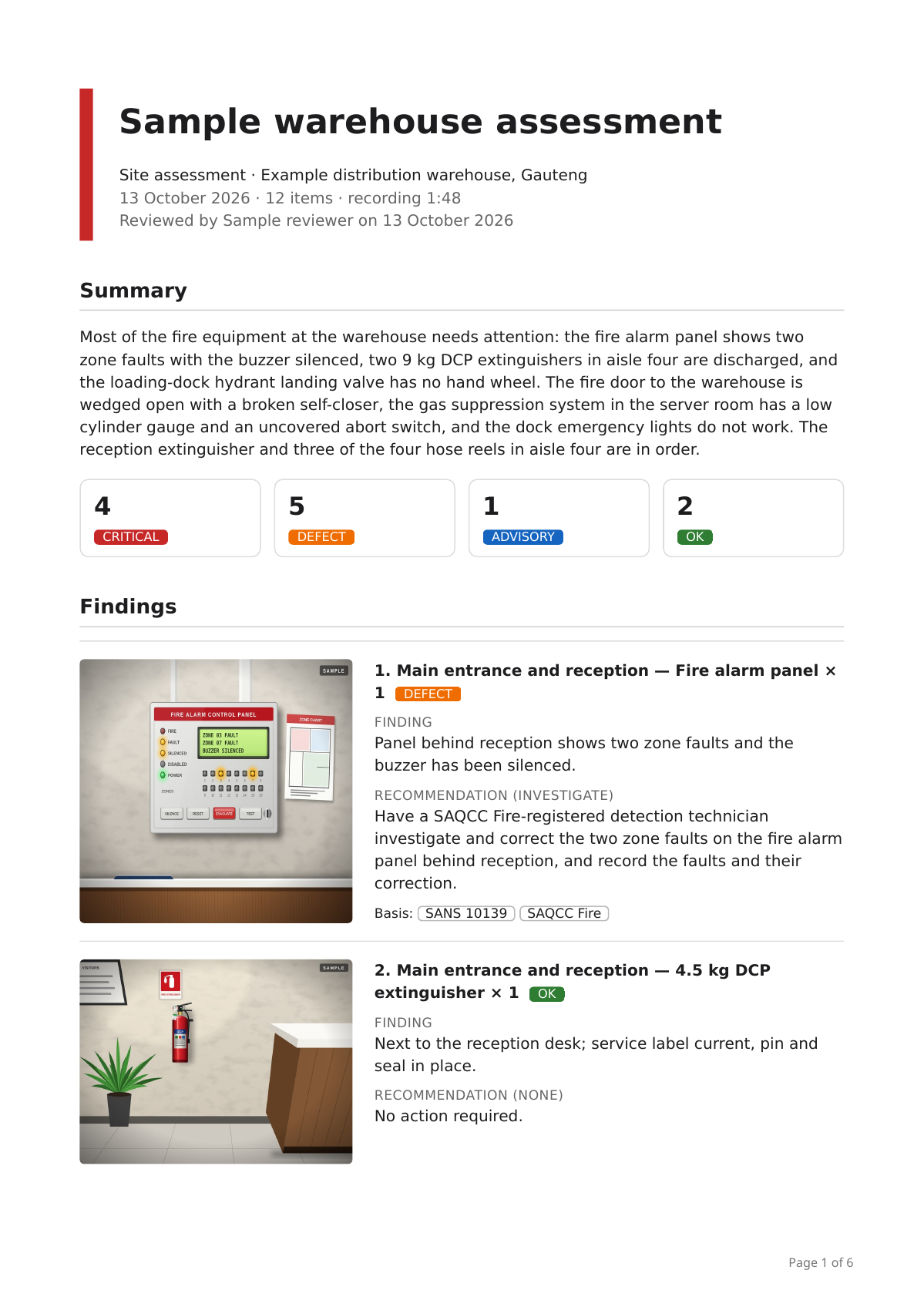
A made-up fire-equipment walk at a made-up warehouse: the finished report, with photos, findings and the references at the back. It isn't a real site or a real inspection.
Try it on one of your own walks
Bring a video of one of your walks to the demo and we'll take you through the draft it makes and how the check works.